 Deconstruct Sun
Sun Study App for Landscape Architects & Designers
Measure direct-sun hours at every planting area on a site visit and hand the client a clean PDF sun study, without building a 3D model first.
Site analysis that starts where the plants will
Light drives almost every planting decision on a residential or campus site, yet it’s usually judged by eye on one visit, on one day. A sun calculator shows the open sky. A 3D shadow study shows only what you’ve modeled. Neither captures the 60-foot oak next door.
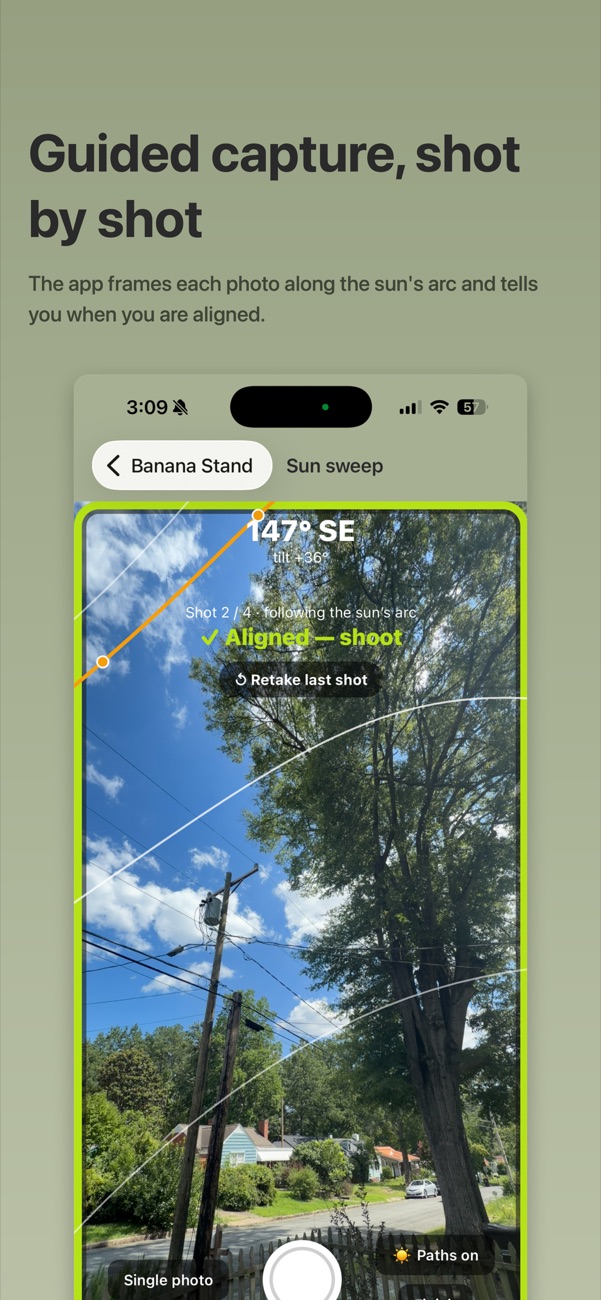
Deconstruct Sun captures the real skyline from the spot itself. Trace the trees and buildings over photos in a guided sweep, and it reports direct-sun hours at that point for today, both solstices and both equinoxes.
- Photo-traced obstruction skyline with a live sun-path camera overlay
- Seasonal breakdown: solstices and equinoxes side by side
- Projects: every planting area on a property under one client
- Branded PDF per site, or one combined report with a comparison table
- USDA hardiness zone for every site, offline
- Coordinates hidden from reports unless you choose to include them

Built to sit beside Rhino, Grasshopper and Ladybug
For design studies, a Ladybug workflow in Rhino and Grasshopper is the gold standard. It’s parametric, repeatable, and runs off real EPW weather files. It is also only as good as the context you model. Mature canopy, the neighbor’s hedge and the utility pole across the street rarely make it into the Grasshopper definition.
Deconstruct Sun covers that gap from the field:
- Before modeling: record existing sun at each planting area on the first site visit, so you know which context actually matters before you build it.
- Checking the model: compare Ladybug sunlight-hours results with measured direct-sun hours at the same points.
- Small jobs: on a residential garden where a full model isn’t billable, the field reading and PDF are the sun study.
The same goes for shadow studies in SketchUp, Revit or Lumion: the model shows designed conditions, and the app shows what’s really there.
On a site visit
Create a project
One per client or property.
Add a site per area
Front border, rain garden, patio, vegetable beds.
Sweep the horizon
The app frames each shot along the sun’s arc and tells you when you’re aligned.
Export one PDF
A combined report compares direct-sun hours across every area.

Deconstruct Sun App Demo: SunSweep, Skyline Tracing & PDF Reports · 3:41
Where it earns its keep
- Planting plans: back up full-sun vs. shade palettes with numbers, and show clients why the hydrangeas go on the east side.
- Turf vs. groundcover: most turfgrasses need 6 or more hours of sun; document where they won’t get it.
- Edible gardens: find the bed location with the most growing-season sun.
- Outdoor rooms: know when a patio is in sun on summer evenings, and when it’s warm on winter afternoons.
- Greenhouses and small solar: compare candidate spots by winter sun, when it matters most.
Built by Andrew Harrell, a licensed landscape architect in North Carolina, for his own practice at Deconstruct Terrain.
Pro is a one-time $11.99
Less than an hour of billable time, and no subscription. Start free to try the sun-path chart and hand-painted skylines.
Questions
How is this different from a 3D shadow study?
A model-based study, whether it’s a Ladybug sunlight-hours analysis in Rhino and Grasshopper or a shadow study in SketchUp, Revit or Lumion, is only as good as the trees and neighboring buildings you model. Deconstruct Sun captures the real skyline from the planting area itself, including the trees you would never model, in a few minutes on site.
Does it replace Ladybug?
No, it works alongside it. Ladybug is the right tool for design studies: massing options, building shadows, whole-site radiation and sunlight-hours maps. Deconstruct Sun is the field check. Use it to measure existing conditions before you build the model, and to check the model’s numbers at the spots where the plants will actually go.
What does the PDF include?
A single-site report shows the sun-path chart with your traced skyline, direct-sun hours for today and each solstice and equinox, first and last sun, and the site’s hardiness zone. A combined project report adds a summary table comparing direct-sun hours across every site on the property.
Can I keep client addresses private?
Yes. You can hide precise coordinates on screen, and every PDF export asks before printing them. Sites and photos are stored only on your phone, never uploaded.
How precise is it?
Sun position comes from standard astronomical formulas and is accurate to a fraction of a degree. The calculation steps every five minutes through the day. The skyline is stored at 5° intervals around the horizon, which suits trees and buildings at site scale. As with any field method, the result depends on how carefully the skyline is traced.
Does it work without a signal?
Yes. Everything, including hardiness zones, works offline, so it works on rural sites and in basements of tall buildings alike.